If you are logged in, follow these steps to update your mobile number:
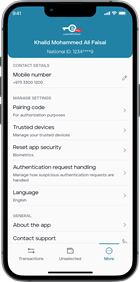
- Navigate to More > Profile.
- Click on your National ID.
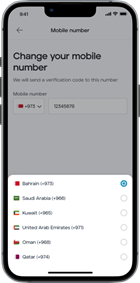
- Choose Mobile Number, enter your new number, and click Continue.
- Enter the verification code sent to you via SMS.
Contact details: Click on "Contact Details" to edit or add your phone number. You can change your mobile number to a local Bahrain number or any GCC mobile number.
Note: If you are logged out or have changed your mobile number, please raise a request through the IN-App support and the support team will assist you with the process.
Was this article helpful?
That’s Great!
Thank you for your feedback
Sorry! We couldn't be helpful
Thank you for your feedback
Feedback sent
We appreciate your effort and will try to fix the article